Showing posts with label Developer Preview. Show all posts

Wednesday, May 17, 2017

What�s New in Android: O Developer Preview 2 & More

Posted by: Dave Burke, VP of Engineering

android-o-logo.png
With billions of Android devices around the world, Android has surpassed our wildest expectations. Today at Google I/O, we showcased a number of ways we�re pushing Android forward, with the O Release, new tools for developers to help create more performant apps, and an early preview of a project we call Android Go -- a new experience that we�re building for entry-level devices.

Fluid experiences in Android O

It's pretty incredible what you can do on mobile devices today, and how easy it is to rely on them as computers in our pockets. In the O release we've focused on creating fluid experiences that make Android even more powerful and easy to use, and today we highlighted some of those:
  • Picture-in-picture: lets users manage two tasks simultaneously, whether it�s video calling your friend while checking your calendar, or reading a new recipe while watching a video on a specific cooking technique. We�ve designed PIP to provide seamless multitasking on any size screen, and it�s easy for apps to support it.

  • Notification dots extend the reach of notifications, a new way for developers to surface activity in their app, driving engagement. Built on our unique and highly regarded notification system, dots work with zero effort for most apps - we even extract the color of the dot from your icon. 

  • Autofill with Google simplifies setting up a new device and synchronizing passwords by bringing Chrome's Autofill feature to Android. Once a user opts-in, Autofill will work out-of-the-box for most apps. Developers can optimize their apps for Autofill by providing hints about the type of data expected or add support in custom views. 

  • A new homescreen for Android TV makes it easy for users to find, preview, and watch content provided by apps. Apps can publish one or more channels, and users can control the channels that appear on the homescreen. You�ll be able to get started with creating channels using the new TvProvider support library APIs

  • Smart Text Selection: In Android O, we�re applying on-device machine learning to copy/paste, to let Android recognize entities like addresses, URLs, telephone numbers, and email addresses. This makes the copy/paste experience better by selecting the entire entity and surfacing the right apps to carry out an action based on the type of entity.

  • TensorFlow Lite: As Android continues to take advantage of machine learning to improve the user experience, we want our developer partners to be able to do the same. Today we shared an early look at TensorFlow Lite, an upcoming project based on TensorFlow, Google�s open source machine learning library. TensorFlow Lite is specifically designed to be fast and lightweight for embedded use cases. Since many on-device scenarios require real-time performance, we�re also working on a new Neural Network API that TensorFlow can take advantage of to accelerate computation. We plan to make both of these available to developers in a maintenance update to O later this year, so stay tuned!  

(L) Android O: Picture-in-picture, (R) Android O: Notification dots


Working on the Vitals in Android

We think Android�s foundations are critical, so we�re investing in Android Vitals, a project focused on optimizing battery life, startup time, graphic rendering time, and stability. Today we showcased some of the work we�ve done so far, and introduced new tools to help developers understand power, performance, and reliability issues in their apps:

  • System optimizations: in Android O, we�ve done a lot of work across the system to make apps run faster and smoother. For example we made extensive changes in our runtime - including new optimizations like concurrent compacting garbage collection, code locality, and more. 

  • Background limits: up to now it�s been fairly easy for apps to unintentionally overuse resources while they�re in the background, and this can adversely affect the performance of the system. So in O, we've introduced new limits on background location and wi-fi scans, and changes in the way apps run in the background. These boundaries prevent overuse -- they�re about increasing battery life and freeing up memory.

  • New Android Vitals Dashboards in the Play Console: today we launched six Play Console dashboards to help you pinpoint common issues in your apps - excessive crash rate, ANR rate, frozen frames, slow rendering, excessive wakeups, and stuck wake locks, including how many users are affected, with guidance on the best way to address the issues. You can visit the Play Console today to see your app's data, then learn how to address any issues.

Android Go

Part of Android�s mission is to bring computing to everyone. We�re excited about seeing more users come online for the first time as the price of entry level smart phones drop, and we want to help manufacturers continue to offer lower-cost devices that provide a great experience for these users. Today we gave a sneak peek of a new experience that we�re building specifically for Android devices that have 1GB or less of memory -- Internally we call it �Android Go,� and it�s designed around three things

  • OS: We�re optimizing Android O to run smoothly and efficiently on entry-level devices

  • Apps: We�re also designing Google apps to use less memory, storage space, and mobile data, including apps such as YouTube Go, Chrome, and Gboard. 

  • Play: On entry-level devices, Play store will promote a better user experience by highlighting apps that are specifically designed for these devices -- such as apps that use less memory, storage space, and mobile data -- while still giving users access to the entire app catalog.

The Android Go experience will ship in 2018 for all Android devices that have 1GB or less of memory. We recommend getting your apps ready for these devices soon -- take a look at the Building for Billions to learn about the importance of offering a useful offline state, reducing APK size, and minimizing battery and memory use.


O Developer Preview 2, Now in Public Beta

Today�s release of O Developer Preview 2 is our first beta-quality candidate, available to test on your primary phone or tablet. We�re inviting those who want to try the beta release of Android O to enroll now at android.com/beta -- it�s an incredibly convenient way to preview Android O on your Nexus 5X, 6P, and Player, as well as Pixel, Pixel XL, or Pixel C device.


With more users starting to get Android O on their devices through the Android Beta program, now is the time to test your apps for compatibility, resolve any issues, and publish an update as soon as possible. See the migration guide for steps and a recommended timeline.


Later today you�ll be able to download the updated tools for developing on Android O, including the latest canaries of Android Studio, SDK, and tools, Android O system images, and emulators. Along with those, you�ll be able to download support library 26.0.0 beta and other libraries from our new Maven repo. The change to Maven from SDK Manager means a slight change to your build configuration, but gives you much more flexibility in how you integrate library updates with your CI systems.


When you�re ready to get started developing with Android O, visit the O Developer Preview site for details on all of the features you can use in your apps, including notification channels and dots, picture-in-picture, autofill, and others. APIs have changed since the first developer preview, so take a look at the diff report to see where your code might be affected.


Thanks for the feedback you�ve given us so far. Please keep it coming, about Android O features, APIs, issues, or requests -- see the Feedback and Bugs page for details on where to report feedback.

Tuesday, May 16, 2017

Android Things Developer Preview 4

Posted by Wayne Piekarski, Developer Advocate for IoT


Today, we are releasing the next Developer Preview 4 (DP4) of Android Things, bringing new supported hardware, features, and bug fixes to the platform. The goal of Android Things is to enable Android Developers to quickly build smart devices, and seamlessly scale from prototype to production using a Board Support Package (BSP) provided by Google.

AIY Projects and Google Assistant SDK

Earlier this month, we announced a partnership with AIY Projects, enabling Android Things support for the Raspberry Pi-based Voice Kit. And now with DP4, the necessary drivers are provided to support the Google Assistant SDK on all Android Things certified development boards. Learn more from the instructions in the sample.
New hardware and driver support

We are now adding a new Board Support Package for the NXP i.MX7D, which supports higher performance than the i.MX6UL while still using a low power System on Module (SoM) design. Support for Inter-IC Sound Bus (I2S) has been added to the Peripheral I/O API, now enabling audio drivers to be written in user space for sound hardware connected via an I2S bus. The AIY Voice Kit sample demonstrates how to use I2S support for audio. We have also provided the ability for developers to enable/disable Bluetooth profiles at run time.
NXP i.MX7D System on Module
Production hardware sample

Android Things is very focused on helping developers build production-ready devices that they can bring to market. This means building custom hardware, in addition to the software running on the Android Things system-on-module (SoM). As a part of this effort, we have released Edison Candle, the first in a series of production samples showcasing hardware and software designed to work together. The code is hosted on GitHub and the hardware design files are on CircuitHub, and can be easily fabricated by many 3rd party companies.
Edison Candle sample with source and schematics


Thank you to all the developers who submitted feedback for the previous developer previews. Please continue sending us your feedback by filing bug reports and feature requests, and asking any questions on stackoverflow. To download images for DP4, visit the Android Things download page and find the changes in the release notes. You can also join Google's IoT Developers Community on Google+, a great resource to get updates and discuss ideas, with over 4,900 members. We also have a number of great talks about Android Things and IoT at Google I/O, which you can view via live stream or as a recording later.


Tuesday, April 11, 2017

Android O to drop insecure TLS version fallback in HttpsURLConnection


Posted by Tobias Thierer, Software Engineer


To improve security, insecure TLS version fallback has been removed from HttpsURLConnection
in Android O.


What is changing and why?


TLS version fallback is a compatibility workaround in the HTTPS stack to connect
to servers that do not implement TLS protocol version negotiation correctly. In
previous versions of Android, if the initial TLS handshake fails in a particular
way, HttpsURLConnection retries the handshake with newer TLS protocol versions
disabled. In Android O, it will no longer attempt those retries. Connections to
servers that correctly implement TLS protocol version negotiation are not
affected.


We are removing this workaround because it weakens TLS by disabling TLS protocol
version downgrade protections. The workaround is no longer needed, because fewer
than 0.01% of web servers relied on it as of late 2015.


Will my app be affected?


Most apps will not be affected by this change. The easiest way to be sure is to
build and test your app with the Android O Developer
Preview
. Your app's HTTPS connections in Android O will not be affected if
they:


  • Target web servers that work with recent versions of Chrome or Firefox,
    because those servers have correctly implemented TLS protocol version
    negotiation. Support for TLS version fallback was removed in Firefox 37 (Mar
    2015) and Chrome 50 (Apr 2016).

  • Use a third-party HTTP library not built on top of HttpsURLConnection. We
    suggest you disable protocol fallback if you're using a third-party library. For
    example, in OkHttp versions up to 3.6, you may want to configure your
    OkHttpClient to only use ConnectionSpec.MODERN_TLS.


My app is affected. What now?


If your app relies on TLS version fallback, its HTTPS connections are vulnerable
to downgrade attacks. To fix this, you should contact whoever operates the
server. If this is not possible right away, then as a workaround you could use a
third-party HTTP library that offers TLS version fallback. Be aware that using
this method weakens your app's TLS security. To discover any compatibility
issues, please test your app against the Android O Developer Preview.

Thursday, April 6, 2017

Android Things Developer Preview 3


Posted by Wayne Piekarski,
Developer Advocate for IoT


Today, we are releasing the Developer Preview 3 (DP3) of Android Things,
bringing new features and bug fixes to the platform. This preview is part of our
commitment to provide regular updates to developers who are building Internet of
Things (IoT) products with our platform. Android developers can quickly build
smart devices using Android APIs and Google services, while staying secure with
updates directly from Google. The System-on-Module (SoM) architecture supports
prototyping with development boards, and then scaling them to large production
runs while using the same Board Support Package (BSP) from Google.


Android Bluetooth APIs


DP3 now includes support for all Android Bluetooth APIs in android.bluetooth
and android.bluetooth.le,
across all Android Things supported hardware. You can now write code that
interacts with both Bluetooth classic and low energy (LE) devices just like a
regular Android phone. Existing samples such as Bluetooth
LE advertisements and scanning
and Bluetooth LE
GATT
can be used unmodified on Android Things. We have also provided two new
samples, Bluetooth
LE GATT server
and Bluetooth audio
sink
.


USB Host support


Android version 3.1 and later supports USB
Host
, which allows a regular user space application to communicate with USB
devices without root privileges or support needed from the Linux kernel. This
functionality is now supported in Android Things, to enable interfacing with
custom USB devices. Any existing code supporting USB Host will work on Android
Things, and an extra sample USB Enumerator is available that demonstrates
how to iterate over and print the interfaces and endpoints for each USB device.


Feedback


Once again, thank you to all the developers who submitted feedback for the
previous developer previews. Please continue to send us your feedback by filing
bug
reports
and feature
requests
, and ask any questions on stackoverflow.
To download images for Developer Preview 3, visit the Android Things download
page, and find the changes in the release
notes
. You can also join Google's IoT
Developers Community
on Google+, a great resource to keep up to date and
discuss ideas, with over 4100 new members.


Tuesday, March 28, 2017

Calling all early adopters for Android Studio previews

Posted by Scott Main, Technical Writer


If you love trying out all of the newest features in Android Studio and helping us make it a better IDE, we're making it even easier to download early preview builds with a new website. Here, you can download and stay up to date on all the latest Android Studio previews and other tools announcements.


Android Studio previews give you early access to new features in all aspects of the IDE, plus early versions of other tools such as the Android Emulator and platform SDK previews. You can install multiple versions of Android Studio side-by-side, so if a bug in the preview build blocks your app development, you can keep working on the same project from the stable version.


The latest preview for Android Studio 2.4 just came out last week, and it includes new features to support development with the Android O Developer Preview. You can download and set up the O preview SDK from inside Android Studio, and then use Android O�s XML font resources and autosizing TextView in the Layout Editor.


By building your apps with the Android Studio preview, you're also helping us create a better version of Android Studio. We want to hear from you if you encounter any bugs.

Tuesday, March 21, 2017

O-MG, the Developer Preview of Android O is here!


Posted by Dave Burke, VP of Engineering

Since the first launch in 2008, the Android project has thrived on the incredible feedback from our vibrant ecosystems of app developers and device makers, as well as of course our users. More recently, we've been pushing hard on improving our engineering processes so we can share our work earlier and more openly with our partners.

So, today, I'm excited to share a first href="http://developer.android.com/preview">developer preview of the next version of the OS: Android O. The usual caveats apply: it's early days, there are more features coming, and there's still plenty of stabilization and performance work ahead of us. But it's booting :).

Over the course of the next several months, we'll be releasing updated developer previews, and we'll be doing a deep dive on all things Android at href="https://events.google.com/io/">Google I/O in May. In the meantime, we'd love your feedback on trying out new features, and of course testing your apps on the new OS.

What's new in O?

Android O introduces a number of new features and APIs to use in your apps. Here's are just a few new things for you to start trying in this first Developer Preview:

Background limits: Building on the work we began in Nougat, Android O puts a big priority on improving a user's battery life and the device's interactive performance. To make this possible, we've put additional automatic limits on what apps can do in the background, in three main areas: implicit broadcasts, background services, and location updates. These changes will make it easier to create apps that have minimal impact on a user's device and battery. Background limits represent a significant change in Android, so we want every developer to get familiar with them. Check out the documentation on href="https://developer.android.com/preview/features/background.html">background execution limits and href="https://developer.android.com/preview/features/background-location-limits.html">background location limits for details.

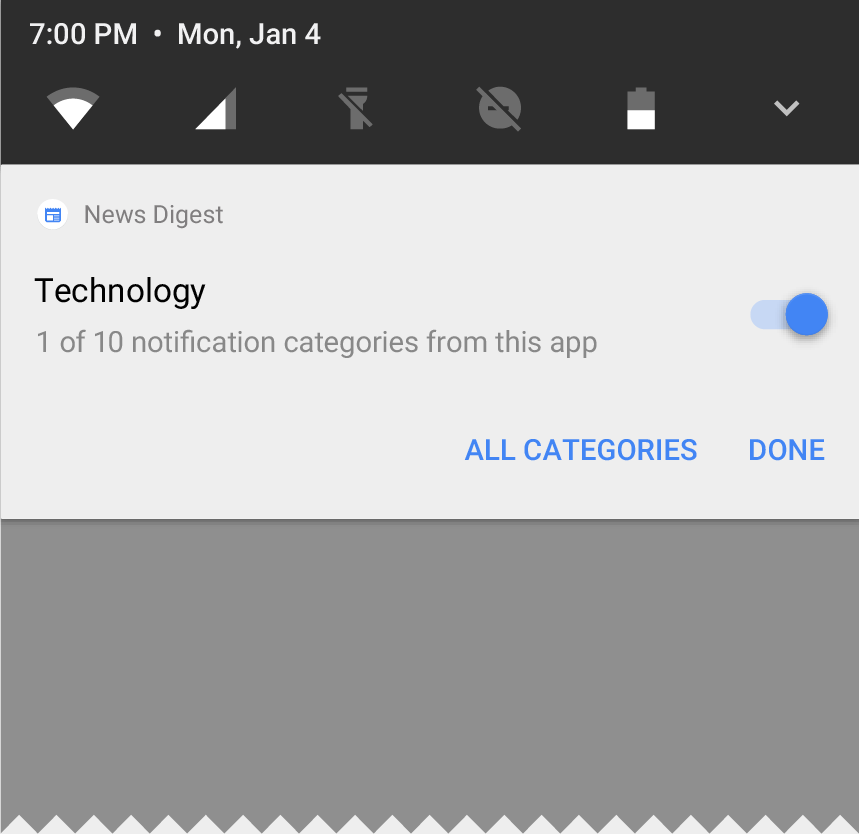
Notification channels: Android O also introduces href="https://developer.android.com/preview/features/notification-channels.html">notification channels, which are new app-defined categories for notification content. Channels let developers give users fine-grained control over different kinds of notifications — users can block or change the behavior of each channel individually, rather than managing all of the app's notifications together.

Notification channels let users control your app's notification categories

Android O also adds new visuals and grouping to notifications that make it easier for users to see what's going on when they have an incoming message or are glancing at the notification shade.

Autofill APIs: Android users already depend on a range of password managers to autofill login details and repetitive information, which makes setting up new apps or placing transactions easier. Now we are making this work more easily across the ecosystem by adding platform support for autofill. Users can select an autofill app, similar to the way they select a keyboard app. The autofill app stores and secures user data, such as addresses, user names, and even passwords. For apps that want to handle autofill, we're href="https://developer.android.com/preview/features/autofill.html">adding new APIs to implement an Autofill service.

PIP for handsets and new windowing features: href="https://developer.android.com/preview/api-overview.html#opip">Picture in Picture (PIP) display is now available on phones and tablets, so users can continue watching a video while they're answering a chat or hailing a car. Apps can put themselves in PiP mode from the resumed or a pausing state where the system supports it - and you can specify the aspect ratio and a set of custom interactions (such as play/pause). Other new windowing features include a href="https://developer.android.com/preview/behavior-changes.html?#cwt">new app overlay window for apps to use instead of system alert window, and href="https://developer.android.com/preview/api-overview.html#mds">multi-display support for launching an activity on a remote display.

Font resources in XML: href="https://developer.android.com/preview/features/working-with-fonts.html">Fonts are now a fully supported resource type in Android O. Apps can now use fonts in XML layouts as well as define font families in XML — declaring the font style and weight along with the font files.

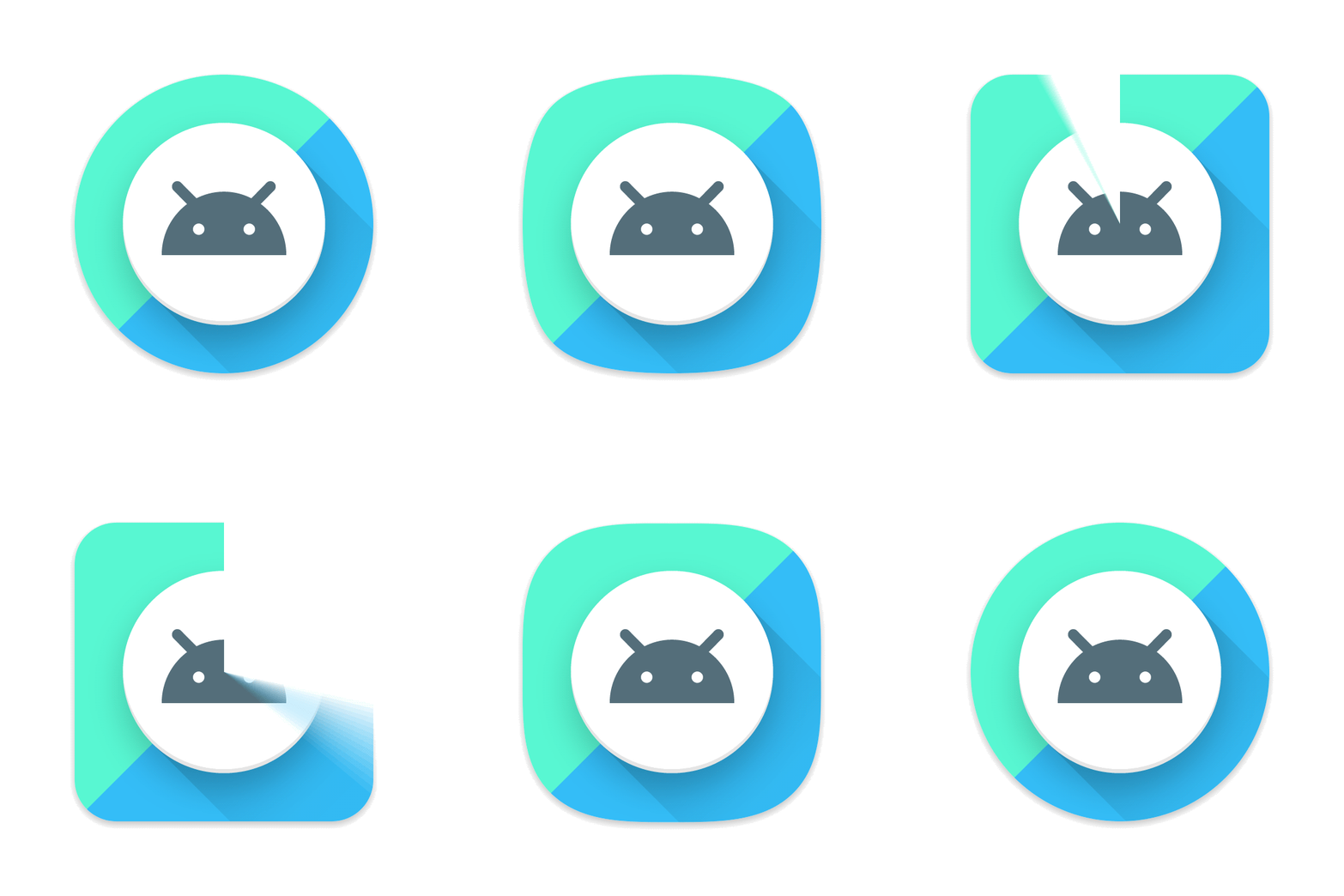
Adaptive icons: To help you integrate better with the device UI, you can now create href="https://developer.android.com/preview/features/adaptive-icons.html"> adaptive icons that the system displays in different shapes, based on a mask selected by the device. The system also animates interactions with the icons, and uses them in the launcher, shortcuts, Settings, sharing dialogs, and in the overview screen.

Adaptive icons display in a variety of shapes across different device models.

Wide-gamut color for apps: Android developers of imaging apps can now take advantage of new devices that have a wide-gamut color capable display. To display wide gamut images, apps will need to enable a flag in their manifest (per activity) and load bitmaps with an embedded wide color profile (AdobeRGB, Pro Photo RGB, DCI-P3, etc.).

Connectivity: For the ultimate in audio fidelity, Android O now also supports high-quality Bluetooth audio codecs such as href="https://www.sony.net/Products/LDAC/">LDAC codec. We're also adding new Wi-Fi features as well, like Wi-Fi Aware, previously known as Neighbor Awareness Networking (NAN). On devices with the appropriate hardware, apps and nearby devices can discover and communicate over Wi-Fi without an Internet access point. We're working with our hardware partners to bring Wi-Fi Aware technology to devices as soon as possible.

The Telecom framework is extending ConnectionService APIs to enable third party calling apps integrate with System UI and operate seamlessly with other audio apps. For instance, apps can have their calls displayed and controlled in different kinds of UIs such as car head units.

Keyboard navigation: With the advent of Google Play apps on Chrome OS and other large form factors, we're seeing a resurgence of keyboard navigation use within these apps. In Android O we focused on building a more reliable, predictable model for "arrow" and "tab" navigation that aids both developers and end users.

AAudio API for Pro Audio: AAudio is a new native API that's designed specifically for apps that require high-performance, low-latency audio. Apps using AAudio read and write data via streams. In the Developer Preview we're releasing an early version of this new API to get your feedback.

WebView enhancements: In Android Nougat we introduced an optional multiprocess mode for WebView that moved the handling of web content into an isolated process. In Android O, we're enabling multiprocess mode by default and adding an href="https://developer.android.com/preview/features/managing-webview.html">API to let your app handle errors and crashes, for enhanced security and improved app stability. As a further security measure, you can now opt in your app's WebView objects to href="https://developer.android.com/preview/features/managing-webview.html#gsb">verify URLs through Google Safe Browsing.

Java 8 Language APIs and runtime optimizations: Android now supports several new Java Language APIs, including the new java.time API. In addition, the Android Runtime is faster than ever before, with improvements of up to 2x on some application benchmarks.

Partner platform contributions: Hardware manufacturers and silicon partners have accelerated fixes and enhancements to the Android platform in the O release. For example, Sony has contributed more than 30 feature enhancements including the href="https://www.sony.net/Products/LDAC/">LDAC codec and 250 bug fixes to Android O.

Get started in a few simple steps

First, make your app compatible to give your users a seamless transition to Android O. Just download a href="https://developer.android.com/preview/download.html">device system image or emulator system image, install your current app, and test -- the app should run and look great, and handle href="https://developer.android.com/preview/behavior-changes.html">behavior changes properly. After you've made any necessary updates, we recommend publishing to Google Play right away without changing the app's platform targeting.

Building with Android O

When you're ready, dive in to O in depth to learn about everything you can take advantage of for your app. Visit the href="https://developer.android.com/preview/index.html">O Developer Preview site for details on the href="https://developer.android.com/preview/overview.html">preview timeline, href="https://developer.android.com/preview/behavior-changes.html">behavior changes, href="https://developer.android.com/preview/api-overview.html">new APIs, and href="https://developer.android.com/preview/feedback.html">support resources.

Plan how your app will support href="https://developer.android.com/preview/features/background.html">background limits and href="https://developer.android.com/preview/behavior-changes.html#o-apps">other changes. Try out some of the great new features in your app -- href="https://developer.android.com/preview/features/notification-channels.html">notification channels, href="https://developer.android.com/preview/api-overview.html#opip">PIP, href="https://developer.android.com/preview/features/adaptive-icons.html">adaptive icons, href="https://developer.android.com/preview/features/working-with-fonts.html">font resources in XML, href="https://developer.android.com/preview/features/autosizing-textview.html">autosizing TextView, and href="https://developer.android.com/preview/api-overview.html">many others. To make it easier to explore the new APIs in Android O, we've brought the href="https://developer.android.com/sdk/api_diff/o-dp1/changes.html">API diff report online, along with the href="https://developer.android.com/reference/packages.html">Android O API reference.

The latest canary version of href="https://developer.android.com/studio/preview/">Android Studio 2.4 includes new features to help you get started with Android O. You can download and set up the O preview SDK from inside Android Studio, then use Android O's href="https://developer.android.com/preview/features/working-with-fonts.html">XML font resources and href="https://developer.android.com/preview/features/autosizing-textview.html">autosizing TextView in the Layout Editor. Watch for more Android O support coming in the weeks ahead.

We're also releasing an href="https://developer.android.com/topic/libraries/support-library/revisions.html">alpha version of the 26.0.0 support library for you to try. This version adds a number of new APIs and increases the minSdkversion to 14. Check out the release notes for details.

Preview updates

The O Developer Preview includes an updated SDK with system images for testing on the official Android Emulator and on Nexus 5X, Nexus 6P, Nexus Player, Pixel, Pixel XL and Pixel C devices. If you're building for wearables, there's also an emulator for testing Android Wear 2.0 on Android O.

We plan to update the preview system images and SDK regularly throughout the O Developer Preview. This initial preview release is for developers only and not intended for daily or consumer use, so we're making it available by manual download and flash only. href="https://developer.android.com/preview/download.html">Downloads and instructions are here.

As we get closer to a final product, we'll be inviting consumers to try it out as well, and we'll open up enrollments through Android Beta at that time. Stay tuned for details, but for now please note that Android Beta is not currently available for Android O.

Give us your feedback

As always, your feedback is crucial, so please href="https://developer.android.com/preview/feedback.html">let us know what you think — the sooner we hear from you, the more of your feedback we can integrate. When you find issues, please href="https://issuetracker.google.com/issues/new?component=190602&template=809005">report them here. We've moved to a more robust tool, href="https://issuetracker.google.com">Issue Tracker, which is also used internally at Google to track bugs and feature requests during product development. We hope you'll find it href="https://developers.google.com/issue-tracker/">easier to use.

Thursday, February 9, 2017

Android Things Developer Preview 2


Posted by Wayne
Piekarski
, Developer Advocate for IoT


Today we are releasing Developer Preview 2 (DP2) for Android Things, bringing
new features and bug fixes to the platform. We are committed to providing
regular updates to developers, and aim to have new preview releases
approximately every 6-8 weeks. Android Things is a comprehensive solution to
building Internet of Things (IoT) products with the power of Android. Now any
Android developer can quickly build a smart device using Android APIs and Google
services, while staying highly secure with updates direct from Google. It
includes familiar tools such as Android Studio, the Android Software Development
Kit (SDK), Google Play Services, and Google Cloud Platform. Android Things
supports a System-on-Module (SoM) architecture, where a core computing module
can be initially used with development boards and then easily scaled to large
production runs with custom designs, while continuing to use the same Board
Support Package (BSP) from Google.


New features and bug fixes

Thanks to great developer feedback from our Developer Preview 1, we have now
added support for USB Audio to the Hardware Abstraction Layer (HAL) for Intel
Edison and Raspberry Pi 3. NXP Pico already contains direct support for audio on
device. We have also resolved many bugs related to Peripheral I/O (PIO). Other
feature requests such as Bluetooth support are known issues, and the team is
actively working to fix these. We have added support for the Intel Joule platform, which offers the most
computing power in our lineup to date.


Native I/O and user drivers


There are many developers who use native C or C++ code to develop IoT software,
and Android Things supports the standard Android NDK. We have now released a
library to provide native access to the Peripheral
API
(PIO), so developers can easily use their existing native code. The documentation
explains the new API, and the sample provides a
demonstration of how to use it.


An important new feature that was made available with Android Things DP1 was
support for user
drivers
. Developers can create a user driver in their APK, and then bind it
to the framework. For example, your driver code could read a GPIO pin and
trigger a regular Android KeyEvent, or read in an external GPS via a serial port
and feed this into the Android location APIs. This allows any application to
inject hardware events into the framework, without customizing the Linux kernel
or HAL. We maintain a repository
of user drivers for a variety of common hardware interfaces such as sensors,
buttons, and displays. Developers are also able to create their own drivers and
share them with the community.


TensorFlow for Android Things


One of the most interesting features of Android Things is the ability to easily
deploy machine learning and computer vision. We have created a highly requested
sample
that shows how to use TensorFlow on
Android Things devices. This sample demonstrates accessing the camera,
performing object recognition and image classification, and speaking out the
results using text-to-speech (TTS). An early-access TensorFlow inference library
prebuilt for ARM and x86 is provided for you to easily add TensorFlow to any
Android app with just a single line in your build.gradle file.


TensorFlow sample
identifying a dog's breed (American Staffordshire terrier) 


on a Raspberry Pi 3
with camera


Feedback


Thank you to all the developers who submitted feedback for the previous
developer preview. Please continue to send us your feedback by filing bug
reports
and feature
requests
, and ask any questions on stackoverflow.
To download images for Developer Preview 2, visit the Android Things download
page, and find the changes in the release
notes
. You can also join Google's IoT
Developers Community
on Google+, a great resource to keep up to date and
discuss ideas, with over 2900 new members.


Tuesday, January 24, 2017

Final Android Wear 2.0 Developer Preview: iOS support. Time to upload your apps to the Play Store!


Posted by Hoi Lam, Developer
Advocate 


Cross platform support by Telegram Messenger


Today, we are releasing the fifth and final developer preview for Android Wear
2.0. In this release, we have added iOS support and included a number of bug
fixes and enhancements. Apps compiled with this preview are now ready for final
submission to the Google Play Store, so it's time to publish
your apps
. As Android Wear 2.0 approaches its final release in early
February, we would like to thank you for your continued feedback during the
developer preview program. Your input has helped us uncover bugs as well as
drive critical product decisions. Thank you!


iOS Support


Since 2015,
you've been able to pair Android Wear watches with iPhones, and now you can
distribute your apps to iPhone-paired watches as well. To do so, just set the standalone=true
flag in your watch app manifest. This lets the Play Store know that your watch
app doesn't require an Android phone app, and therefore can appear in the Play
Store
on watches paired to iPhones. To pair your watch to an iPhone and
test, just follow these
steps
.


<application �>
<meta-data android:name="com.google.android.wearable.standalone" android:value="true"/>

</application>


The available network bandwidth for standalone apps can be lower than expected,
as the platform balances battery savings vs network bandwidth. Make sure to
check out these guidelines
for accessing the network, including accessing Wi-Fi and cellular networks on
watches paired with iPhones.


Also with this developer preview release, Android Wear apps running on watches
paired with iOS devices will be able to perform phone hand-off flows such as OAuth
and RemoteIntent
for launching a web page on a paired iOS device.


Uploading Your App to the Google Play Store


The final developer preview includes an update to the Wearable Support Library.
Apps compiled with API level 25 and this support library are considered ready
for deployment in the Google Play Store. Please note that there are no updates
to the preview watch image or emulator in this developer preview release.


Other Enhancement and Bug Fixes


  • Navigation Drawer: Flip
    a flag
    to toggle to the single-page, icon-only navigation drawer, which provides
    faster, more streamlined navigation to different views in your app.

  • NFC HCE support: NFC
    Host Card Emulation
    FEATURE_NFC_HOST_CARD_EMULATION is now
    supported.

  • ProGuard and Complication API: New ProGuard configuration
    means complication data container classes will no longer be obfuscated. This
    fixes a ClassNotFoundException when watch faces are trying to access data supplied
    by a complication data provider.


Countdown to Launch


Thank you for the fantastic level of feedback we have gotten from you as
developers. Check out g.co/wearpreview for
the latest builds and documentation, and be sure to publish
your apps
before the Android Wear 2.0 consumer launch in early February. As
we work towards the consumer launch and beyond, please continue filing bugs or posting comments in our Android Wear
Developers
community. We can't wait to see your Android Wear 2.0 apps!

Tuesday, November 22, 2016

Final update to Android 7.1 Developer Preview


Posted by Dave Burke, VP of Engineering


Today we're rolling out an update to the Android 7.1 Developer Preview -- the
last before we release the final Android 7.1.1 platform to the ecosystem.
Android 7.1.1 includes the developer features already available on Pixel and
Pixel XL devices and adds optimizations and bug fixes on top of the base Android
7.1 platform. With Developer Preview 2, you can make sure your apps are ready
for Android 7.1.1 and the consumers that will soon be running it on their
devices.


As href="https://android-developers.blogspot.com/2016/10/android71-dev-preview-available.html">highlighted
in October, we're also expanding the range of devices that can receive this
Developer Preview update to Nexus 5X, Nexus 6P, Nexus 9, and Pixel C.


If you have a supported device that's enrolled in the href="http://www.android.com/beta">Android Beta Program, you'll receive an
update to Developer Preview 2 over the coming week. If you haven't enrolled your
device yet, just visit the site to
enroll your device and get the update.


In early December, we'll roll out Android 7.1.1 to the full lineup of supported
devices as well as Pixel and Pixel XL devices.


What's in this update?


Developer Preview 2 is a release candidate for Android 7.1.1 that you can use to
complete your app development and testing in preparation for the upcoming final
release. In includes near-final system behaviors and UI, along with the latest
bug fixes and optimizations across the system and Google apps.


It also includes the developer features and APIs (API level 25) already
introduced in Developer Preview 1. If you haven't explored the developer
features, you'll want to take a look at href="https://developer.android.com/preview/shortcuts.html?utm_campaign=android_launch_developerpreview_112216&utm_source=anddev&utm_medium=blog">app shortcuts,
href="https://developer.android.com/preview/api-overview.html?utm_campaign=android_launch_developerpreview_112216&utm_source=anddev&utm_medium=blog#circular-icons">round
icon resources, and href="https://developer.android.com/preview/image-keyboard.html?utm_campaign=android_launch_developerpreview_112216&utm_source=anddev&utm_medium=blog">image keyboard
support, among others -- you can see the href="https://developer.android.com/preview/api-overview.html?utm_campaign=android_launch_developerpreview_112216&utm_source=anddev&utm_medium=blog">full list of
developer features here.


With Developer Preview 2, we're also updating the SDK build and platform tools
in Android Studio, the Android 7.1.1 platform, and the API Level 25 emulator
system images. The latest version of the support library (href="https://developer.android.com/topic/libraries/support-library/revisions.html?utm_campaign=android_launch_developerpreview_112216&utm_source=anddev&utm_medium=blog">25.0.1)
is also available for you to href="https://developer.android.com/reference/android/support/v13/view/inputmethod/InputConnectionCompat.OnCommitContentListener.html?utm_campaign=android_launch_developerpreview_112216&utm_source=anddev&utm_medium=blog">add
image keyboard support, href="https://developer.android.com/reference/android/support/design/widget/BottomNavigationView.html?utm_campaign=android_launch_developerpreview_112216&utm_source=anddev&utm_medium=blog">bottom
navigation, and other features for devices running API Level 25 or earlier.


For details on API Level 25 check out the href="https://developer.android.com/sdk/api_diff/25/changes.html?utm_campaign=android_launch_npreview_061516&utm_source=anddev&utm_medium=blog">API
diffs and the updated href="https://developer.android.com/reference/packages.html?utm_campaign=android_launch_npreview_061516&utm_source=anddev&utm_medium=blog">API
reference on the href="https://developer.android.com/preview/index.html">developer preview
site.


Get your apps ready for Android 7.1


Now is the time to optimize your apps to look their best on Android 7.1.1. To
get started, update to href="https://developer.android.com/studio/index.html?utm_campaign=android_launch_npreview_061516&utm_source=anddev&utm_medium=blog">Android
Studio 2.2.2 and then download the API Level 25 platform, emulator system
images, and tools through the SDK Manager in Android Studio.


After installing the API Level 25 SDK, you can update your project's
compileSdkVersion to 25 to build and test against the new APIs. If you're doing
compatibility testing, we recommend updating your app's targetSdkVersion to 25
to test your app with compatibility behaviors disabled. For details on how to
set up your app with the API Level 25 SDK, see href="https://developer.android.com/preview/setup-sdk.html?utm_campaign=android_launch_npreview_061516&utm_source=anddev&utm_medium=blog">Set
up the Preview.


If you're adding app shortcuts or circular launcher icons to your app, you can
use Android Studio's built-in Image Asset Studio to quickly help you create
icons of different sizes that meet the href="https://material.google.com/style/icons.html#icons-product-icons">material
design guidelines. You can test your round icons on the Google APIs emulator
for API Level 25, which includes support for round icons and the new Google
Pixel Launcher.


Android Studio and the Google APIs emulator let you quickly create and test
your round icon assets.


If you're adding image keyboard support, you can use the Messenger and Google
Keyboard apps included in the preview system images for testing as they include
support for this new API.


Scale your tests using Firebase Test Lab for Android


To help scale your testing, make sure to take advantage of href="http://android-developers.blogspot.com/2016/11/android-dev-preview-in-firebase-test-lab.html">Firebase
Test Lab for Android and run your tests in the cloud at no charge during the
preview period on all virtual devices including the Developer Preview 2 (API
25). You can use the automated crawler (href="https://firebase.google.com/docs/test-lab/robo-ux-test">Robo Test) to
test your app without having to write any test scripts, or you can upload your
own instrumentation (e.g. Espresso) tests. You can upload your tests href="https://console.firebase.google.com/project/_/testlab/run">here.


Publish your apps to alpha, beta or production channels in Google
Play


After you've finished final testing, you can publish your updates compiled
against, and optionally targeting, API 25 to Google Play. You can publish to
your alpha, href="https://developer.android.com/distribute/engage/beta.html?utm_campaign=android_launch_npreview_061516&utm_source=anddev&utm_medium=blog">beta,
or even production channels in the Google Play Developer Console. In this way,
push your app updates to users whose devices are running Android 7.1, such as
Pixel and Android Beta devices.


Get Developer Preview 2 on Your Eligible Device


If you have an eligible device that's already enrolled in the href="https://android.com/beta">Android Beta Program, the device will get
the Developer Preview 2 update over the coming week. No action is needed on your
part. If you aren't yet enrolled in program, the easiest way to get started is
by visiting android.com/beta and opt-in
your eligible Android phone or tablet -- you'll soon receive this preview update
over-the-air. As always, you can also download and href="https://developer.android.com/preview/download.html?utm_campaign=android_launch_npreview_061516&utm_source=anddev&utm_medium=blog#flash">flash
this update manually.


As mentioned above, this Developer Preview update is available for Nexus 5X,
Nexus 6P, Nexus 9, and Pixel C devices.


We're expecting to launch the final release of the Android 7.1.1 in just a few
weeks Starting in December, we'll roll out Android 7.1.1 to the full lineup of
supported preview devices, as well as the recently launched Pixel and Pixel XL
devices. At that time, we'll also push the sources to AOSP, so our device
manufacturer partners can bring this new platform update to consumers on their
devices.


Meanwhile, we continue to welcome your feedback in the href="https://code.google.com/p/android/issues/list?can=1&q=label%3ADevPreview-N-7.1">Developer
Preview issue tracker, href="https://plus.google.com/communities/105153134372062985968/stream/755bb91d-c101-4e32-9277-1e560c4e26d2">N
Preview Developer community, or href="https://plus.google.com/communities/106765800802768335079">Android Beta
community as we work towards the final consumer release in December!

Thursday, November 3, 2016

Test on Android 7.1 Developer Preview in Firebase Test Lab

By Ahmed Mounir Gad, Product Manager, Firebase Test Lab


To deliver the best user experience right out of the gate, Firebase Test Lab for Android allows you to test your apps and ensure their compatibility with multiple device configurations, across OS versions, screen orientations, and locales. With a single click, you can run your tests on hundreds of device configurations in Google Cloud and receive your results quickly.


Today, we�re excited to announce the availability of the Android 7.1 Developer Preview on Firebase Test Lab virtual devices. In addition to testing the Android 7.1 Developer Preview on your physical Android Device with the Android Beta program, or on your local Android Emulator, you can use the Firebase Test Lab to scale your app testing to hundreds of Android virtual devices.


You can also use Firebase Test Lab to perform your own testing. If you don�t have any test scripts, Robo test is ideal for doing your basic compatibility testing on the new platform. It crawls your app in an attempt to find crashes. You can also use the Espresso Test Recorder in Android Studio to record your own instrumentation tests without writing any code.


From now until the end of December (12/31/2016), Firebase Test Lab will be offered at no charge on the Firebase Blaze plan for all virtual devices, to help you ensure the compatibility of your app with the Android 7.1 Developer Preview release, as well as with other Android releases.


Prepare your app for API level 25, then go to the Firebase Test Lab console to run your first test.


Happy testing!


Robo tests uncovering a crash on Android 7.1 Developer Preview for the Flood-It! app.


Wednesday, October 19, 2016

Now available: Android 7.1 Developer Preview


Posted by Dave Burke, VP of Engineering


A couple of weeks ago we announced that a developer preview of Android 7.1 Nougat was on the way. You can get started with this new release today by downloading the SDK and tools. To get the 7.1 release on your eligible device, enroll your device in the Android Beta program. If your device is already enrolled, you'll receive the update automatically.


What�s in the Developer Preview?


The Android 7.1 Developer Preview gives you everything you need to test your app on the new platform or extend it with new features like app shortcuts and image keyboard support. It includes an updated SDK and tools, documentation and samples, as well as emulators and device system images for running your apps on supported devices.


We�re continuing the model we used in N and earlier releases, and with Android 7.1 being an incremental release there are a few differences to highlight:


  • Since 7.1 has already launched on Pixel, we�re delivering the initial Developer Preview at beta quality for the Nexus lineup of devices. The goal is to tease out any device-specific issues.

  • We�ve finalized the new APIs as API Level 25

  • We�ve opened up publishing on Google Play for apps targeting the new API level, so you can update your apps soon as you are ready.


After the initial preview release, we plan to deliver an update in November followed by the final public release to the Android Open Source Project (AOSP) in December. Initially available on Nexus 5X, Nexus 6P, and Pixel C devices, we�ll extend the Developer Preview to other devices in November.


Get your apps ready for Android 7.1


To get started, update to Android Studio 2.2.2 and download API Level 25 platform, emulator system images and tools. The final API Level 25 SDK is available for download through the SDK Manager in Android Studio.


Once you�ve installed the API Level 25 SDK, you can update your project�s compileSdkVersion to 25 to build and test against the new APIs. If you�re doing compatibility testing, we recommend updating your app�s targetSdkVersion to 25 to test your app with compatibility behaviors disabled. For details on how to set up your app with the API Level 25 SDK, see Set up the Preview.


If you�re adding app shortcuts or circular launcher icons to your app, you can use Android Studio�s built-in Image Asset Studio to quickly help you create icons of different sizes that meet the material design guidelines.


The Google APIs Emulator System images shipped with the Android API Level 25 SDK include support for round icons and the new Google Pixel Launcher. The Google API system image allows you to test how your app�s circular app icons look in devices that support circular icons. Also, if you are developing live wallpapers, you can also use the the new system images with the Android Emulator to test the enhanced preview metadata in Android 7.1.


To help you add image keyboard support, you can use the Messenger and Google Keyboard apps included in the preview system images for testing as they include support for this new API.


Along with the API Level 25 SDK, we have also updated the Android Support Library to 25.0.0. The new version lets you add image keyboard support with compatibility back to API level 13. It also introduces BottomNavigationView widget, which implements the bottom navigation pattern from the material design guidelines.


For details on API Level 25 check out the API diffs and the updated API reference on the developer preview site.


Image keyboard support on Nexus 6P

You can use the Android Emulator in Android Studio to test your circular app icons & shortcuts in a launcher


App shortcuts on Nexus 6P

You can use the Image Asset tool to quickly create circular icon assets.


Publish your apps to alpha, beta or production channels in Google Play


Since the Android 7.1 APIs are final, you can publish updates compiling with, and optionally targeting, API 25 to Google Play. You can now publish app updates that use API 25 to your alpha, beta, or even production channels in the Google Play Developer Console. In this way, push your app updates to users whose devices are running Android 7.1, such as Pixel and Android Beta devices.

How to Get Android 7.1 Developer Preview on Your Eligible Device


If you are already enrolled in the Android Beta program, then your eligible enrolled devices will get the Android 7.1 Developer Preview update right away, no action is needed on your part. If you aren�t yet enrolled in Android Beta, the easiest way to get started is to visit android.com/beta and opt-in your eligible Android phone or tablet -- you�ll soon receive this (and later) preview updates over-the-air. If you have an enrolled device and do not want to receive the update, just visit Android Beta and unenroll the device. You can also download and flash this update manually.


We welcome your feedback in the Developer Preview issue tracker, N Preview Developer community, or Android Beta community as we work towards the consumer release in December!


Tuesday, October 11, 2016

Coming soon: Android 7.1 Developer Preview


Posted by Dave Burke, VP of Engineering


Today, we�re taking the wraps off of Android 7.1 Nougat, the latest version of the platform. You probably saw a sneak peek of it at last week�s event. It�s an incremental update based on Android 7.0 but includes new features for consumers and developers — from platform Daydream VR support and A/B system updates to app shortcuts and image keyboard support.


We�ve already been working closely with device makers to get them ready for Android 7.1, and next we�ll give you access to this update so you can start getting your apps ready.


Later this month we�ll be bringing you the Android 7.1 platform as an open Developer Preview, similar to what we did for Android 7.0. You�ll be able to test and build on the new platform and try the latest features.


As always, we�ll deliver the Developer Preview through the Android Beta program, which makes it incredibly easy to participate.


What�s in Android 7.1?


Android 7.1 delivers the productivity, security, and performance of Android 7.0, along with a variety of optimizations and bug fixes, features, and new APIs (API level 25).


For developers, Android 7.1 adds new capabilities to help you drive engagement in your app and deliver an improved user experience, such as:


  • App shortcuts API — lets you surface key actions directly in the launcher and take your users deep into your app instantly. You can create up to 5 shortcuts, either statically or dynamically.

  • Circular app icons support — lets you provide great-looking rounded icon resources that match the look of Pixel and other launchers.

  • Enhanced live wallpaper metadata — lets you provide metadata about your live wallpapers to any picker displaying the wallpapers as a preview. You can show existing metadata such as label, description, and author, as well as a new context URL and title to link to more information.


Android 7.1 also adds these much-requested developer features to the platform:


  • Image keyboard support — expands the types of content that users can enter from their keyboards, letting them express themselves through custom stickers, animated gifs, and more. Apps can tell the keyboard what types of content they accept, and keyboards can deliver all of the images and other content that they offer to the user. For broad compatibility, this API will also be available in the support library.

  • Storage manager Intent — lets an app take the user directly to a new Settings screen to clear unused files and free up storage space on the device.


For carriers and calling apps, the platform includes new APIs to support multi-endpoint calling and new telephony configuration options.


Image keyboard support on Nexus 6P

Image keyboard support: Let users input images and other content directly from a keyboard.


App shortcuts on Nexus 6P

App shortcuts: Use app shortcuts to surface key actions and take users deep into your app instantly.


Get your apps ready


Android 7.1 is an incremental release, but it�s always important to make sure your apps look and run great — especially as devices start to reach consumers.


The Android 7.1 Developer Preview will give you everything you need to test your apps or extend them with new features like shortcuts or keyboard images. Included are the SDK with new APIs, build tools, documentation and samples, as well as emulators and device system images for running your apps on supported Nexus devices. We�ll also include a launcher and apps that support app shortcuts, and a keyboard and apps that support keyboard images.


If you want to receive the Developer Preview automatically, visit Android Beta and enroll your device. If you previously enrolled a device and haven�t unenrolled, your device will receive the update. If you already enrolled but don�t want to receive the update, visit Android Beta to unenroll the device as soon as possible.


Initially, we�ll offer the Developer Preview for Nexus 5X, Nexus 6P, and Pixel C devices, extending to other supported devices by the end of the preview. At the final release of the Android 7.1.x platform, due in early December, we�ll roll out updates to the full lineup of supported devices — Nexus 6, 5X, 6P, 9, Player, Pixel C, and supported Android One devices — as well as Pixel and Pixel XL devices.


Coming to consumer devices soon


We�re working with our partners to bring Android 7.1 to devices in the ecosystem over the months ahead, so we recommend downloading the Android 7.1 Developer Preview as soon as it�s available. Test your apps for compatibility and optimize them to look their best, such as by providing circular app icons and adding app shortcuts.


Meanwhile, stay tuned, we�ll be sharing more details about the Developer Preview soon!

Wednesday, June 15, 2016

Android N APIs are now final, get your apps ready for Android N!

Posted by Dave Burke, VP of Engineering


As we put the finishing touches on the href="https://developer.android.com/preview/index.html?utm_campaign=android_launch_npreview_061516&utm_source=anddev&utm_medium=blog">next release of
Android, which will begin to roll out to consumers later this summer, we�re
releasing the 4th Developer Preview of Android N, including the Android N final
SDK
. And thanks to your continued feedback over the last three releases, all of
the APIs are now final as well. If you�ve already enrolled your device in the
Android Beta Program, (available at href="https://android.com/beta">android.com/beta) you will receive an update
to this Developer Preview shortly.


Get your apps ready for Android N


The final SDK for Android N is now available for download through the SDK
Manager in Android
Studio
. It gives you everything you need to develop and test against the
official APIs in the Android N platform. Once you�ve installed the final SDK,
you can update your project�s compileSdkVersion to API 24 to
develop with the Android N APIs and build and test on the new platform, for href="https://developer.android.com/preview/api-overview.html?utm_campaign=android_launch_npreview_061516&utm_source=anddev&utm_medium=blog">new features
such as Multi-window support, direct-reply notifications, and others. We also
recommend updating your app�s targetSdkVersion to API 24 to opt-in
and test your app with Android N specific href="https://developer.android.com/preview/behavior-changes.html?utm_campaign=android_launch_npreview_061516&utm_source=anddev&utm_medium=blog">behavior
changes. For details on how to setup your app with the final SDK, see href="https://developer.android.com/preview/setup-sdk.html?utm_campaign=android_launch_npreview_061516&utm_source=anddev&utm_medium=blog">Set up the
Preview. For details on API level 24 check out the href="https://developer.android.com/sdk/api_diff/24/changes.html?utm_campaign=android_launch_npreview_061516&utm_source=anddev&utm_medium=blog">API diffs
and the updated href="https://developer.android.com/reference/packages.html?utm_campaign=android_launch_npreview_061516&utm_source=anddev&utm_medium=blog">API reference,
now hosted online.


Along with the Android N final SDK, we�ve also updated the href="https://developer.android.com/topic/libraries/support-library/revisions.html?utm_campaign=android_launch_npreview_061516&utm_source=anddev&utm_medium=blog">Android
Support Library to 24.0.0. This allows you to use multi-window and
picture-in-picture callbacks, new notification features, methods for supporting
Direct Boot, and new MediaBrowser APIs in a backward compatible manner.


Publish your apps to alpha, beta or production channels in Google Play


Now that you have a final set of APIs, you can publish updates compiling with,
and optionally targeting, API 24 to Google Play. You can now publish app updates
that use API 24 to your alpha, beta, or even production channels in the Google
Play Developer Console. In this way, you can test your app�s
backward-compatibility and push updates to users whose devices are running
Developer Preview 4.


To make sure that your updated app runs well on Android N, as well as older
versions, a common strategy is to use href="https://developer.android.com/distribute/engage/beta.html?utm_campaign=android_launch_npreview_061516&utm_source=anddev&utm_medium=blog">Google Play�s
beta testing feature to get early feedback from a small group of users --
including developer preview users — and then do a staged rollout as you release
the updated app to all users.


How to Get Developer Preview 4


Developer Preview 4 includes updated system images for all supported Preview
devices as well as for the Android emulator. If you are already enrolled in the
Android Beta program, your devices will
get the Developer Preview 4 update right away, no action is needed on your part.
If you aren�t yet enrolled in Android Beta, the easiest way to get started is by
visiting android.com/beta and opt-in your
eligible Android phone or tablet -- you�ll soon receive this (and later) preview
updates over-the-air. As always, you can also download and href="https://developer.android.com/preview/download.html?utm_campaign=android_launch_npreview_061516&utm_source=anddev&utm_medium=blog#flash">flash this
update manually. The N Developer Preview is available for Nexus 6, Nexus 5X,
Nexus 6P, Nexus 9, and Pixel C devices, as well as General Mobile 4G [Android
One] devices and the Sony Xperia Z3.


Thanks so much for all of your feedback so far. Please continue to share
feedback or requests either in the href="https://code.google.com/p/android/issues/list?can=2&q=label%3ADevPreview-N">N
Developer Preview issue tracker, href="https://plus.google.com/communities/103655397235276743411">N
Preview Developer community, or href="https://plus.google.com/communities/106765800802768335079">Android Beta
community as we work towards the consumer release later this summer. We�re
looking forward to seeing your apps on Android N!